Online Booking and Payment Systems for UK Service Businesses
The two businesses we have built booking systems for came at it from opposite ends. EFR Skips and Onyx Recycling took bookings over the phone and ran the yard on spreadsheets. Leeds & Wakefield Skip Hire already had WordPress and WooCommerce doing the job, which worked, but was slow, awkward to change and carrying plugin overhead neither brand needed. Both now run on booking flows, pricing rules and payment paths we wrote for them.
functions/ · the logic, layer 2 of 4
In practice that means a customer lands on your site, gives you the few details the price actually depends on (for skip hire, a postcode and a skip size) and gets a number back in seconds. They choose a delivery date and a time slot from live availability. Then they pay by card, Apple Pay or Google Pay through Stripe. Where part of a trade still settles with the driver on the day, a cash-on-delivery route sits alongside the card one rather than replacing it; on the EFR and Onyx build both paths run through the same booking flow rather than one being bolted on afterwards.
The part that takes the most work is everything after the payment. A booking that arrives as an email is not a system. On both of these projects the customer gets a private link to their own order and can extend a hire, book a collection, swap to a different skip size or settle a balance without ringing the office. Pricing is deliberately server-authoritative the whole way through (the browser asks what something costs and the server decides) and the quote engine is shared, so nobody can edit their way to a cheaper skip, and the website, the office system and the WhatsApp bot cannot drift apart on price.
What's included
8 items, all in the fixed price
- 01A multi-step booking flow (six steps on the EFR and Onyx build) that asks one thing at a time and collects only what the price and the delivery genuinely depend on.
- 02Postcode-zone pricing with live availability and delivery time slots, so the slot a customer books is one you can actually service.
- 03Stripe card checkout with Apple Pay and Google Pay, plus a separate cash-on-delivery path for customers who would rather settle with the driver.
- 04A booking API written around your rules (pricing, availability, coupon validation, address lookup and payments) instead of a plugin stack configured to approximate them.
- 05Server-authoritative pricing from a quote engine shared across every channel that quotes; on EFR and Onyx that means the public site, the office system and a WhatsApp Business integration all price from one place.
- 06A tokenised per-order portal where customers handle hire extensions, exchanges, collections and outstanding balances themselves, opened from a private link with no account to create, with tokens stored hashed so a link can be issued but never looked up.
- 07An order-management portal for whoever runs the office; on EFR and Onyx that extends into an internal operations platform covering jobs, invoicing, HR, rotas and driver checks.
- 08Migration off your current setup with permanent redirects mapping previously indexed URLs to their new homes (45 of them on the Leeds & Wakefield rebuild) and per-brand configuration where one backend serves two sites without either leaking the other's branding.
How it runs
stage 1 / 4
Write down the pricing rules
Nothing gets built until the pricing is written down properly. We sit with whoever currently quotes on the phone and pull out the real rules: which postcodes fall in which zone, what changes the price, which materials or waste types cost more, where the exceptions are and who is allowed to override them. This is where most of the difficulty in a booking system lives, not in the code. Occasionally the honest answer at this stage is that you do not need one yet. Qube Self Storage came to us before their facility had opened, with nothing to book and no prices published, so we built an interest-registration funnel and a private CRM for the owner to work the list from instead.
stage 2 / 4
Build the flow and the payment path
The booking flow and the API behind it get built together, because the flow is only ever as good as what the server will tell it. Stripe runs in test mode throughout, so you can put test cards through the entire journey and see exactly what a customer sees. Coupon validation, address lookup, availability, time slots and the cash-on-delivery route are all built at this stage, and you get a working preview to click through rather than a screenshot to approve.
stage 3 / 4
Everything after the payment
Then comes the half nobody demos: the confirmation email, the order record, the customer's private portal, and the screens your office uses when somebody rings wanting a longer hire or a different size. We work through the awkward cases on purpose, an extension that changes the balance, an exchange that needs a driver, a collection booked for a date you cannot service, because those are exactly the ones that end up back on the phone if they are not handled properly.
stage 4 / 4
Migrate, redirect and launch
If you are replacing an existing system, every URL search engines already know about is mapped to its new home before anything switches over, so a rebuild does not quietly cost you the pages people were already finding you through. This is also where the search groundwork goes in: the Leeds & Wakefield rebuild carries 39 local landing pages across the LS and WF postcode districts, each with its own content, plus structured data, per-crawler robots rules and an llms.txt. We schedule the switch around your quiet hours and stay on it afterwards, because real bookings turn up things test cards do not.
A good fit if
- Service businesses where the price is a calculation rather than a list, postcode, distance, size, duration or material all moving the number.
- Anyone taking bookings by phone during office hours, where an enquiry at nine in the evening has to wait until morning before it can become an order.
- Businesses on WooCommerce, a booking plugin, or a contact-form-and-invoice workaround that has been bent to do something it was never designed for.
- Operations where the order keeps changing after it is placed (extensions, swaps, collections, outstanding balances) and every one of those changes currently arrives as a phone call.
Probably not, if
- If you sell one service, at one price, in one length of appointment, you want a calendar and not a booking platform. Calendly, Fresha or the scheduling already built into whatever you run will do it this afternoon for a monthly fee, and a custom build cannot honestly justify its cost against that. We would rather say so on the call than quote for it.
- If you are selling physical products off a shelf (stock levels, shipping options, returns, VAT on goods) that is ecommerce, and Shopify will do it better than we would by building it from scratch. What we are good at is pricing a job and taking payment for that job, which is a different problem with different edges.
- We have not built marketplace payments, subscription billing, or anything that holds money on behalf of a third party. Everything described on this page comes from one-off checkout and balance settlement against jobs. If you need recurring billing, split payouts to other businesses or client money handling, that is genuine regulated complexity and you want somebody who has shipped it before, not us learning it on your account.
Where we've done it
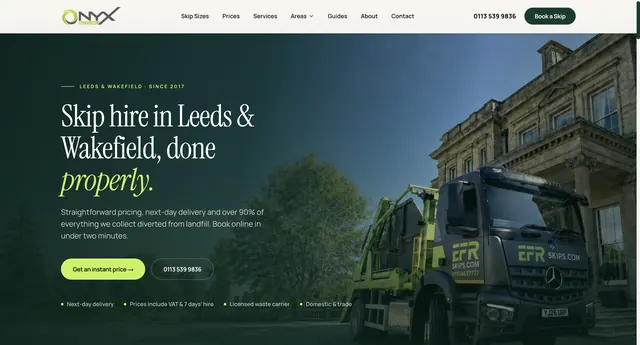
Waste management
EFR Skips & Onyx Recycling
Online booking and payment for two skip-hire brands, plus the internal operations platform their office and drivers run on.
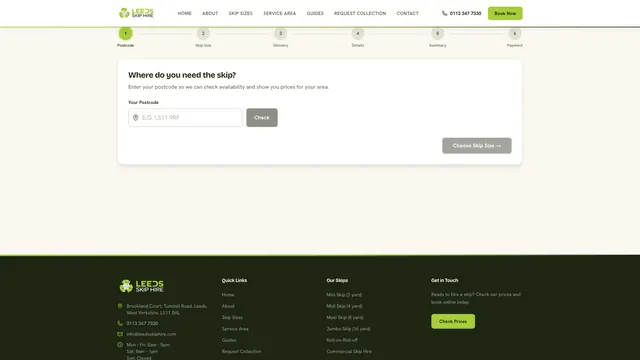
Waste management
Leeds & Wakefield Skip Hire
Replaced two WordPress/WooCommerce skip-hire sites with statically exported Next.js builds and a purpose-built booking API.
Want a price for this?
Tell us what you need. We aim to reply within one working day, then agree the scope and a fixed price before work starts.